Creating a beautiful marriage biodata is an important step when looking for a life partner. A well-designed marriage biodata helps you introduce yourself, share your personal information, and present your family background in a simple and organized way.
Whether you are preparing a biodata for yourself, your son, your daughter, or a family member, choosing the right format and adding accurate information can make a big difference.
In this guide, we will explain how to create Marriage Biodata step by step and share practical tips to make your biodata professional, readable, and suitable for sharing with prospective families.
Steps to Create Marriage Biodata
Creating a marriage biodata becomes easier when you follow a simple process. Instead of designing everything from scratch, you can use an online marriage biodata creator to prepare your profile in a few straightforward steps.
Here is how you can create your marriage biodata online.
Choose Marriage Biodata Template
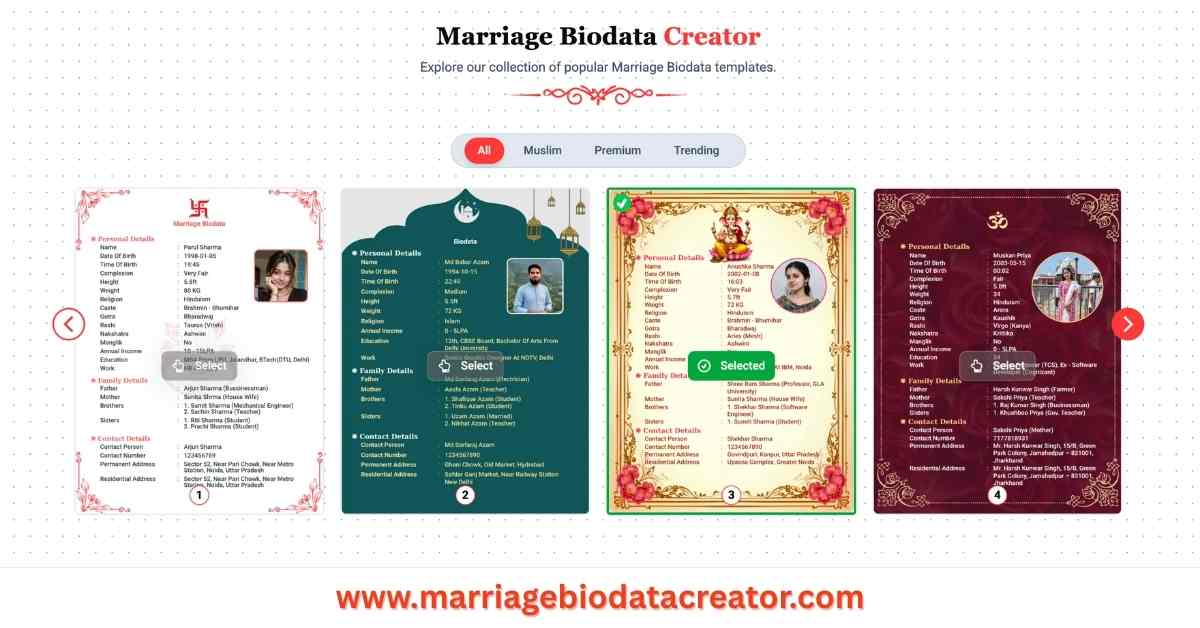
The first step is choosing a suitable marriage biodata template. A template determines how your personal information, photograph, family details, and other important sections will appear on the final biodata.
Visit MarriageBiodataCreator.com to explore marriage biodata designs and choose a template that matches your preferences.
A good marriage biodata format should look clean, attractive, and easy to read. Avoid selecting a design only because it looks colorful or decorative. Instead, choose a template that presents your information properly without making the page look crowded.
You can select a traditional marriage biodata format if you prefer a simple and formal design. Traditional templates are suitable for families who want a straightforward presentation of personal, educational, professional, and family information.
If you prefer something modern, choose a marriage biodata design with attractive colors, stylish headings, and a balanced layout.
For example, a simple biodata template with a photograph at the top and personal details below can create a professional appearance.
Fill in Your Details
After selecting your marriage biodata template, the next step is entering your personal information.
Make sure your details are accurate, complete, and presented in an organized manner. Your marriage biodata should provide enough information for prospective families to understand your background without making the document unnecessarily lengthy.
Here are the important details you can include:
- Personal Information: Full name, date of birth, height, religion, mother tongue, marital status, and other relevant details.
- Educational Information: Highest qualification, college or university name, and additional qualifications.
- Professional Information: Occupation, company name, work location, and professional background.
- Family Information: Father's name, mother's name, their occupations, siblings, and family background.
- About Me: A short introduction describing your personality, hobbies, interests, and lifestyle.
- Partner Preferences: Optional information about the qualities, values, and expectations you are looking for in a life partner.
- Contact Information: A suitable contact person's name, phone number, and location.
You can also include horoscope details such as birth time, birthplace, rashi, nakshatra, gotra, and manglik status if these are important to your family.
When filling in your details, use simple language and avoid unnecessary information. Keep your descriptions honest and meaningful.
For example, instead of writing a long paragraph about your career, mention your qualification, occupation, and current work location clearly.
Similarly, your About Me section should reflect your actual personality rather than using generic statements.
See Live Preview
Once you have entered your information, check the live preview of your marriage biodata.
A live preview allows you to see how your information appears in the selected template before downloading the final document.
This step is important because the information entered in the form may look different when displayed in the actual biodata layout.
Check whether your name, photograph, personal details, and family information are properly aligned.
Make sure the text is readable and that important sections are not overlapping or appearing too close together.
If your biodata includes a photograph, check whether it fits the selected template properly.
You should also review the overall appearance of the document. A good marriage biodata should have balanced spacing, readable fonts, and clearly separated sections.
If something does not look right, update your information or select another template.
Take a few minutes to review the preview carefully before downloading your marriage biodata.
Download Biodata
After reviewing your marriage biodata and making the necessary changes, the final step is downloading your biodata.
A PDF is generally a convenient format for sharing marriage biodata because it maintains the document's layout across different devices.
You can save your marriage biodata on your mobile phone or computer and share it with prospective families through WhatsApp, email, or other communication platforms.
Before sharing the PDF, open it once and check that all information appears correctly.
Make sure your photograph is clear, your contact details are accurate, and there are no spelling mistakes.
If you have created multiple versions of your biodata, save them with meaningful filenames so you can identify the correct document easily.
Using Marriage Biodata Creator, you can create your marriage biodata online, customize your selected design, preview your details, and download the completed biodata.
Tips to Create Biodata for Marriage
Creating a marriage biodata is not only about selecting a beautiful template. The information you include and the way you present it also matter.
Here are some useful tips to create an attractive and professional marriage biodata.
1. Keep Your Biodata Simple and Organized
A simple marriage biodata is easier to read and understand. Organize your information into separate sections such as personal details, education, career, family background, and About Me.
Avoid adding unnecessary decorations that make the document difficult to read.
2. Use a Clear and Recent Photograph
Choose a recent photograph with good lighting and a clean background. Your photograph should clearly show your face and should look natural.
Avoid blurry images, heavily edited photographs, or pictures with distracting backgrounds.
3. Write Accurate Personal Information
Always provide correct information about your education, occupation, family background, height, and other details.
Accuracy helps build trust between families and prevents misunderstandings during future conversations.
4. Write a Meaningful About Me Section
Your About Me section should introduce your personality and interests.
Mention your hobbies, lifestyle, values, and the things you enjoy doing in your free time.
Instead of writing only that you are simple and family-oriented, explain what makes your personality unique.
5. Choose a Suitable Marriage Biodata Format
Select a marriage biodata format that matches your preferences and family requirements.
A traditional design may be suitable for families who prefer a formal presentation, while a modern template can be useful if you want a stylish and contemporary appearance.
Choose a design that makes your information easy to understand.
6. Avoid Unnecessary Personal Information
Include information that is relevant to introducing yourself to prospective families.
You do not need to share sensitive personal information such as financial account details, passwords, or unnecessary identity documents.
Share your contact information thoughtfully and consider your privacy before distributing your biodata widely.
7. Check Spelling and Grammar
Review your marriage biodata carefully before downloading it.
Correct spelling mistakes, grammatical errors, and incomplete information.
A properly written biodata creates a better impression and shows that you have taken care while preparing your profile.
8. Maintain a Balanced Design
Do not use too many fonts, colors, or decorative elements.
Choose readable fonts and maintain consistent spacing throughout the document.
Your biodata should look attractive without distracting readers from the important information.
9. Keep Your Biodata Updated
Update your marriage biodata whenever your professional, educational, or personal information changes.
For example, if you complete a new qualification, change your occupation, or move to another city, make sure your biodata reflects the latest information.
10. Use an Online Marriage Biodata Maker
An online marriage biodata maker can save time and simplify the entire process.
Instead of creating a design manually, you can select a template, enter your details, preview the document, and download the finished biodata.
Visit www.marriagebiodatacreator.com to create your marriage biodata online and prepare a personalized profile using a suitable design.
FAQs
How to create Marriage biodata?
You can create marriage biodata by selecting a suitable template, entering your personal details, educational qualifications, professional information, family background, and photograph. After filling in your information, check the live preview to ensure everything looks correct. Finally, download your marriage biodata in PDF format and share it with prospective family.